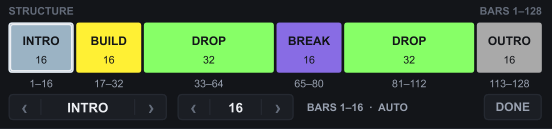
One click puts a guide track in your Arrangement with intro, build, drop, break and outro at the right bars for the style. Drag the parts of your loop under the blocks, and the track is drawn.
Instant download · free updates
Ableton Live 12 · Suite or Standard with Max for Live
The loop is good. What does not come is the decision: where the break sits, when the drop lands, how long the outro runs. The empty Arrangement does not answer, and the project stays there.
Arrangement Finisher answers in one click. It creates a track in your Set, ARRANGEMENT GUIDE, with empty, named, coloured blocks at the bars of a finished track. It does not write your music. It shows where each part goes, and you fill it in.
Drop the device on any MIDI track and pick the style. The guide track appears at the bottom of the list and Live opens the Arrangement. The strip on the panel shows the blocks, with bar numbers, before anything plays in your Set.

On a phone, the panel shows in parts, top to bottom.
LENGTH changes the length in steps of 8 bars, up to 512, and the panel shows the minutes at your project's BPM. START BAR is where the first block begins.
Click any block to give it its own length, a longer break, a shorter intro. It keeps that length and the others stay put. Changed your mind, REPLACE GUIDE rewrites the blocks, and Ctrl+Z undoes.
$15, one-time · through Gumroad · instant download · free updates
General, House, Tech House, Techno, Minimal and Drum & Bass. Each opens at the size of a finished track. At 128 BPM, 192 bars is six minutes. The block-by-block lengths are in the questions further down.

Tempo, key, time signature, locators, mixer, routing, the other tracks and your clips stay as they are. If a clip of yours sits where a block would go, it stops, tells you which clip and which bar, and writes nothing. REPLACE only removes the blocks it made. Delete the guide track and the guide is gone.
You get one file, the install and quick-start guides, and the limitations written down. If your case is the opposite, an Arrangement that already has the blocks and needs to be filled, LOOP2TRACK does that with your clips.
What a great product, it's easy to use, intuitive, and makes coming up with chords, basslines, and melodies much faster. A really useful addition to my library.
I was looking for something like that! It works like magic!
An excellent, well thought out and made plugin.
Dope tool to get the low end right. Thanks!
Gracias por tan fantástica herramienta para LIVE.
oh? oh. ooohhhhhhhhhhh… yeeeeeesssss.
Public reviews from the Gumroad store, as written there. Reviews left without a name show as anonymous, like on the store. See them on the store.
I make Max for Live devices and I make my own records. I made Arrangement Finisher after counting how many of my projects had a good loop and no track. It was a lot. The block lengths come from finished tracks, not from a guess.
Found a bug? Write me. It gets fixed and you get the fix for free, through the same download link.
No. It writes a track of empty, named, coloured clips at the right bars. It generates no MIDI and no audio, does not detect your loop and does not move your clips. You arrange, it shows where.
The length of each one, yes. Click a block and give it the length you want; the others stay put. Creating, deleting, renaming or reordering blocks is not in this version. The blocks are the style's.
GENERAL, 128 bars: INTRO 16, BUILD 16, DROP 32, BREAK 16, DROP 32, OUTRO 16. HOUSE and TECH HOUSE, 192: INTRO 32, GROOVE 32, BREAK 16, DROP 32, BREAK 16, DROP 32, OUTRO 32. TECHNO, 224: INTRO 48, BUILD 32, MAIN 32, BREAK 16, MAIN 48, OUTRO 48. MINIMAL, 224: INTRO 32, GROOVE 32, VARIATION 32, BREAK 16, GROOVE 32, VARIATION 32, OUTRO 48. DRUM & BASS, 224: INTRO 32, BUILD 32, DROP 32, BREAK 16, BUILD 16, DROP 64, OUTRO 32. All adjustable with LENGTH, in steps of 8 bars, up to 512.
Tested on Live 12.3.5 Suite, on Windows 10. Not yet tested on macOS. It uses nothing system-specific; if it does not run on your Mac, write me.
Live 11, no. It needs Live 12 with Max for Live, and Live Intro and Live Lite cannot run Max for Live devices. No internet, account or key. Instant download through Gumroad: one file plus the install, quick-start and limitations guides, in English and Portuguese.
A guide track with the blocks at the right bars. Pick the style and the length, press CREATE ARRANGEMENT, and fill in the map.
Through Gumroad · instant download · free updates
Ableton Live 12 · Suite or Standard with Max for Live
Download, drop it in, use it on every machine you own for as long as you own them. Updates land in your Gumroad library for free. Found a bug? Write me and it gets fixed.