LOOP2TRACK reads what is already in your Arrangement and builds the track from intro to outro with copies of your own clips. It invents nothing of yours, and deletes nothing of yours.
Instant download · free updates
Ableton Live 12.2 · Suite with Max for Live · macOS and Windows
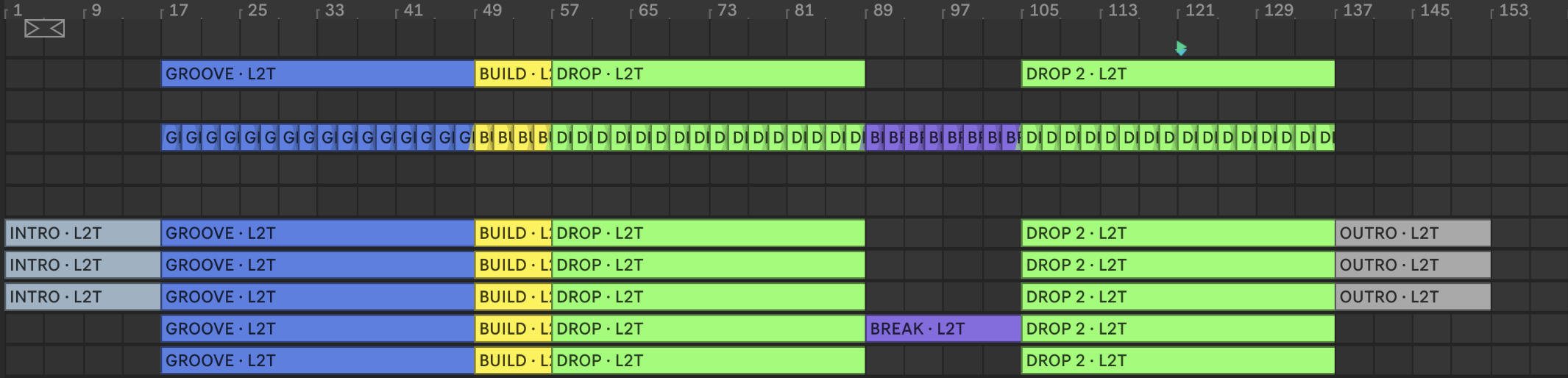
You have the groove, maybe a break. What is missing is six minutes of deciding who comes in when, and the project stays at 24 bars.
LOOP2TRACK decides from what you already did. The emptiest stretch of your Arrangement becomes the break, the fullest becomes the drop, and it writes the track after your material, track by track, with copies of your clips in your colour. You open it, hear the whole track, and adjust from there.

On a phone, the panel shows in parts, top to bottom.
After the BUILD, drag any section to make it longer or shorter, or switch it off. In the matrix, click the dots to decide, track by track, who plays in each part. One click does the opposite of what is happening, a second one hands the decision back to the device.
$21, one-time · through Gumroad · instant download · free updates
The shape comes from 710 released tracks, annotated section by section, and from 157 finished projects. Those numbers barely change between Tech House, House, Techno and Melodic: the shape depends on the music, not the genre. In a real session, with 28 tracks and 24 bars of material, it laid out a 176-bar track and wrote 636 clips on 17 tracks in about 20 seconds. Nothing in the Set was deleted, moved or changed.
You get one file, the PDF manual with pictures of the panel and the START HERE guide. If all you want is the map, to fill in by hand, Arrangement Finisher does that.
Man, this was exactly what I needed for when I get stuck on the loop.
It went straight into my workflow. I open it, work the idea and get much further, much faster.
Really useful for that moment when you know the loop is good but don't know the next step.
What I liked most was the speed. I can test a direction and move on without breaking the flow.
I used it on an idea that had been sitting still for days and finally got the track moving.
Less time thinking about what to do next and more time producing.
It's one of those simple tools you start using and realise was missing from your workflow.
My process got much faster, especially in the stretch between making the loop and starting the arrangement.
What a great product, it's easy to use, intuitive, and makes coming up with chords, basslines, and melodies much faster. A really useful addition to my library.
The LOOP2TRACK quotes are from people who bought the device, first name only, translated from Portuguese. The last one is a public review from the Gumroad store. See them on the store.
I make Max for Live devices and I make my own records. LOOP2TRACK is the device that finished the most tracks of mine. I use it on the first day of every project, to hear the whole track before deciding whether it deserves the week.
Found a bug? Write me. It gets fixed and you get the fix for free, through the same download link.
The device running in Live, from READ ARRANGEMENT to BUILD THE TRACK. Narrated in Portuguese; the panel speaks for itself.
Never. It writes after your material. If a clip of yours sits where the track would go, it stops, tells you which clip and which bar, and writes nothing. REVERT removes only what it wrote, and every clip it writes ends in " · L2T".
Not copied. None of it. Filter sweeps, volume rides, clip envelopes: Live gives a device no function to read or write automation. It can see that a clip carries envelopes and flags it by name, but it cannot carry them over.
The section lengths are the medians of 710 released tracks, annotated section by section, and of 157 finished projects. Those numbers barely change between Tech House, House, Deep House, Techno, Progressive and Melodic: the shape depends on the music, not the genre. Kick from bar one, or only at the first drop, is your call: of the 157 tracks measured, 41% have the kick in the first eight bars.
No. It needs Live 12.2 or newer, with Max for Live. Tested on Live 12.3.5. Live Intro and Live Lite cannot run Max for Live devices.
Tested on macOS and Windows. No internet, account or key. Instant download through Gumroad: the device, the PDF manual with pictures of the panel, the START HERE guide and the list of limitations.
It reads your Arrangement, measures where the empty and the full parts are, and writes the track after your material. Copy by copy, in your colour.
Through Gumroad · instant download · free updates
Ableton Live 12.2 · Suite with Max for Live · macOS and Windows
Download, drop it in, use it on every machine you own for as long as you own them. Updates land in your Gumroad library for free. Found a bug? Write me and it gets fixed.